Restaurant POSthat never stops.
Covers is restaurant POS software built for India. Take orders, send them to the kitchen, print GST bills, collect UPI and watch your money, all in one simple app that keeps working when the internet doesn’t.
- Works offline
- GST & FSSAI ready
- Android or any browser
- Live the same day
Built around the problems every restaurant owner knows
We spent time on real restaurant floors before writing code. These are the problems Covers was built to fix.
The internet drops during service
Billing, kitchen tickets and payments carry on. Everything syncs when the connection is back, with a gap-free invoice series.
Staff give discounts or cancel items
Only a manager can. Audit at a glance flags anyone doing more voids or discounts than the rest of the team.
Cash never matches
Count the notes at day close. Any short or over amount is flagged and emailed to the owner automatically.
Setting up the menu takes days
Photograph your printed menu. Dishes, sizes and prices are read in about 25 seconds and checked by you before going live.
Weekend rush, too few captains
Guests order and pay by UPI from the table QR. No app to install and no aggregator commission.
Many outlets, one owner
Every outlet on one screen. Ask “how did Baner do yesterday?” and get the numbers in seconds.
Everything a restaurant runs on, in one POS
Eight modules that share one menu, one set of staff and one source of truth, from the first KOT to the profit and loss statement.
Fast, correct GST billing
Bills that are right the first time, with the details your CA and the tax department expect.
- CGST, SGST and IGST with GST and HSN per dish
- Split payments across cash, UPI and card
- UPI QR for the exact amount on screen
- Tips, service charge and round-off
- Discounts only with manager approval
- Full tax invoice on WhatsApp, total in words
Printed KOTs, a kitchen display, or both
Every dish reaches the right station, on paper, on screen or both, so nothing gets lost between captain and cook.
- Print, display or both, per station
- Separate printers for kitchen, bar, tandoor
- Kitchen display with timers, two taps a ticket
- CANCEL KOT when a sent dish is voided
- Reprints marked REPRINT and recorded by name
- Keeps printing when the internet is down
Every table at a glance
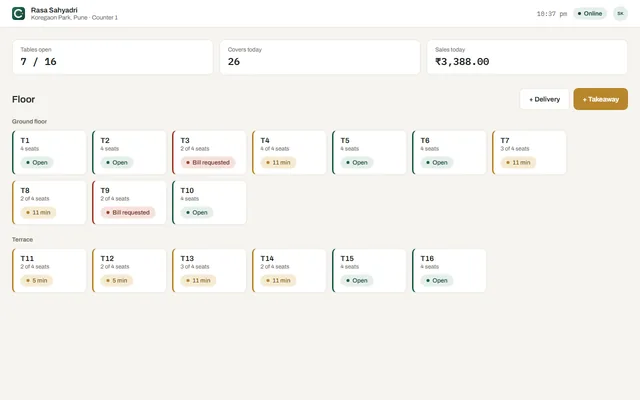
See which tables are open, waiting or ready to bill, across floors and sections.
- Dine-in, takeaway and delivery
- Move and merge tables in one step
- Captain app on any Android phone
- QR ordering per table
- Sections like AC hall, garden, terrace
- Time-at-table indicators
Menu and stock that keep food cost honest
Build your menu in minutes and track every ingredient from purchase to plate.
- Menu from a photo, PDF or Excel
- Sizes like Half/Full and add-ons
- Ingredients, suppliers and purchases
- Wastage and food cost per dish
- Supplier bill scan with AI
- Mark dishes unavailable instantly
Staff, roles and attendance
Everyone signs in with their own PIN, so every action is recorded by name. Big teams find themselves with a quick search.
- Owner, manager, captain and cashier roles
- Permissions per outlet, for example captains who take payment
- PIN sign-in, with search for big teams
- Clock-in with hours worked
- Manager corrections, logged
- Read-only access for your CA
Regulars who keep coming back
Know your guests and reward them, without a separate loyalty app.
- Customer profiles and visit history
- Loyalty points and coupons
- Khata (credit) accounts for regulars
- Feedback after the meal
- Bills on WhatsApp
- Guest details captured at billing
Numbers you can act on
From today’s sales to a full profit and loss statement, for one outlet or all of them.
- Any period, including custom dates
- Sales by item, category, staff and payment
- Profit and loss with food cost
- Daily summary by email
- Download as Excel
- Ask AI questions in plain words
Control without micromanaging
Owners see what deserves a look, and every change is recorded by name.
- Manager-only voids and discounts
- AI audit summary in a few lines
- Who changed what, by name and time
- Block a lost tablet from Admin
- Re-link a reset device safely
- Day close with cash count
KOT printing and a kitchen display, your way
Some kitchens want paper, some want a screen, many want both. Choose in Covers Admin › Kitchen, for the whole kitchen or station by station.
- Print only, Display only, Print + Display, or per station (bar on paper, main kitchen on screen)
- One order splits into a KOT for each station, at the same moment
- Network, USB, Bluetooth or built-in thermal printers, 58 mm or 80 mm
- A warning on every terminal if a printer runs out of paper or goes offline
From the first clock-in to the last bill
Follow a service at our demo outlet, a Maharashtrian kitchen in Koregaon Park, Pune. The restaurant, people and numbers are invented to show Covers in use.
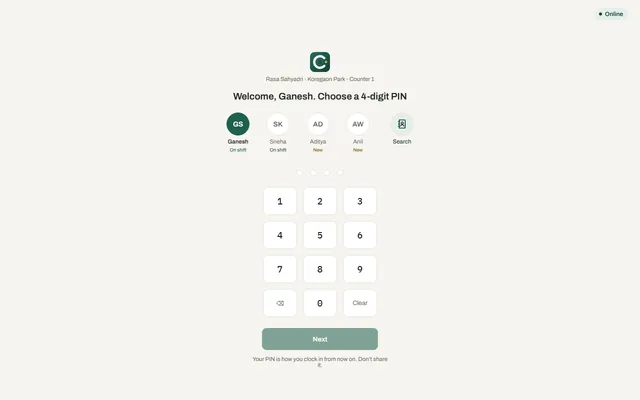
The team clocks in with a PIN
Each person picks their name, or searches for it in a big team, and enters a 4-digit PIN. Hours are recorded for payroll, and every action from now on carries their name.
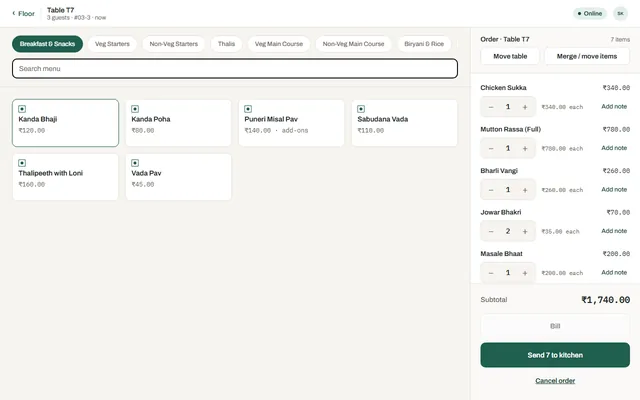
Table 7 orders in seconds
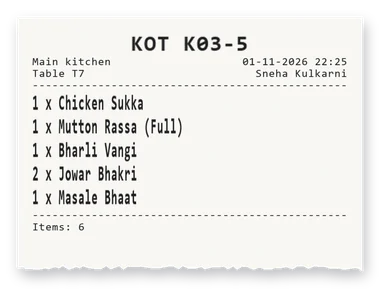
The captain adds Chicken Sukka, Mutton Rassa (Full) and Jowar Bhakri on a tablet or phone. Sizes, add-ons and notes are one tap away.
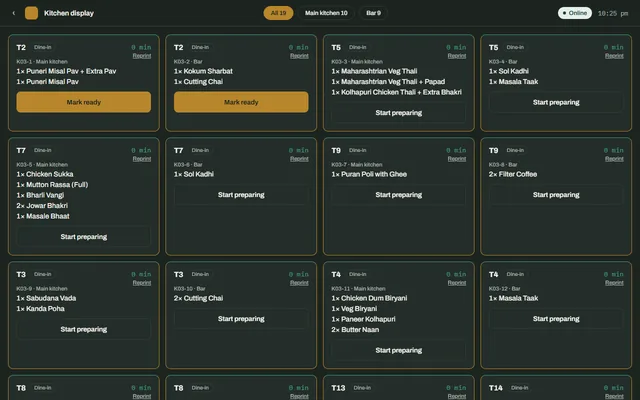
The kitchen sees it instantly
The ticket appears on the kitchen display and prints at the right station. Two taps take it from preparing to ready, and the captain is told.
Food to the kitchen, drinks to the bar
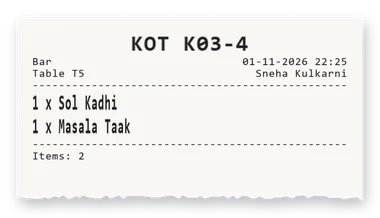
The same order prints as two KOTs: the dishes on the kitchen printer, the drinks at the bar. Quantities print large, so the cook reads them from a step away.
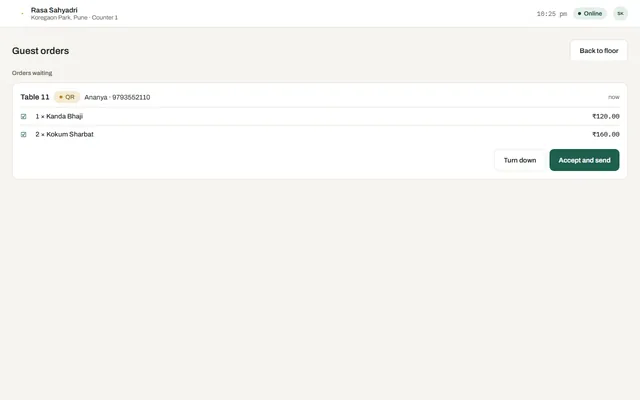
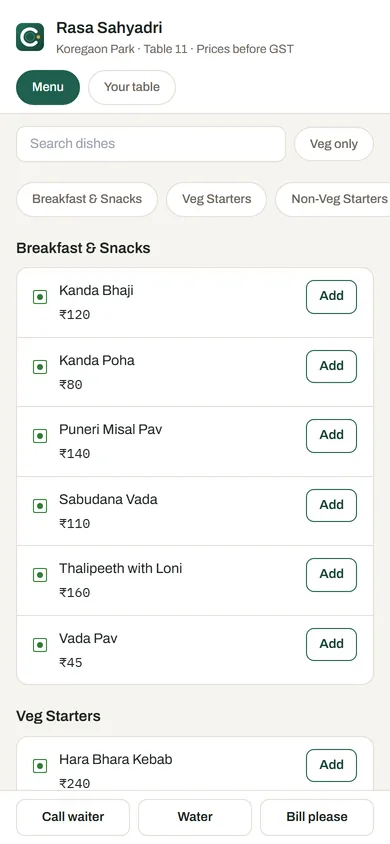
A terrace guest orders from the table QR
No app, no waiting. You choose whether staff approve each QR order or it goes straight to the kitchen.
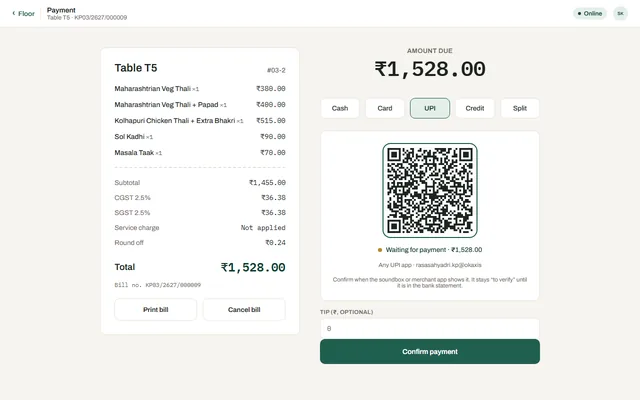
GST bill and UPI in one flow
The bill shows CGST and SGST, GSTIN and FSSAI. The guest scans a UPI QR for the exact amount, or splits between cash, card and UPI.
Who’s waiting for the bill?
Tables that asked for the bill turn red on every terminal, so the cashier goes there first. Gold tables are still eating, with the minutes since they sat down.
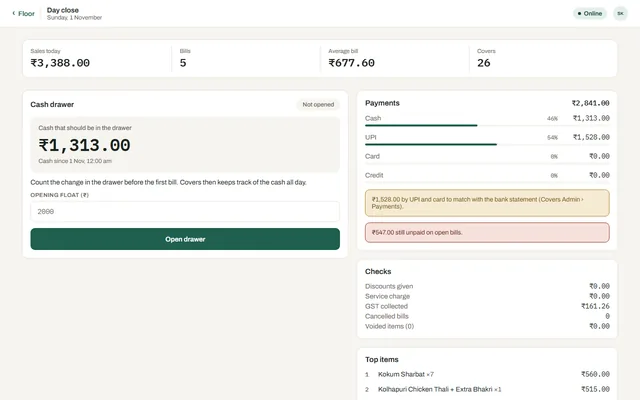
Count the cash and go home
Count the notes, and any difference is flagged. The owner gets the day’s summary by email and can ask Covers questions from their phone.
AI that saves time, not just a buzzword
Covers uses AI in four places where it makes a real difference to your day. You stay in control of every change.
Ask in plain words
“What sold best today?” Answers in seconds from your own reports, while you get on with other work.
Covers: Sales were up on the previous Tuesday, led by Misal Pav and thalis.
Audit at a glance
Voids, discounts, cancellations and cash differences that stand out, written up in a few lines with names.
Menu from a photo
Dishes, sizes and prices are read from your printed menu in about 25 seconds. You review everything before it goes live.
Recipes and supplier bills
Recipe suggestions for food cost and supplier bill scanning for stock, so purchases are entered without typing.
Guests order and pay from their phone
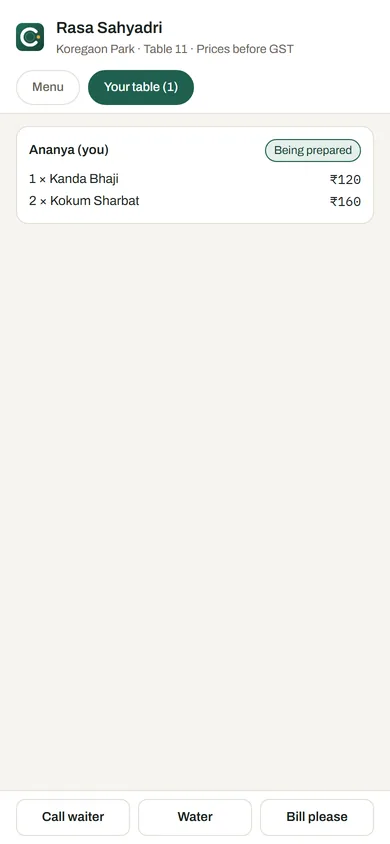
Guests scan the QR on the table, order, call the waiter, follow their food and pay by UPI. There is no app to install and no commission to an aggregator.
- Staff approve each order, or send it straight to the kitchen
- Call waiter and request bill from the table
- Live order status for the guest
- Pause QR ordering from Covers Admin at any time
- Switched on per outlet when you are ready
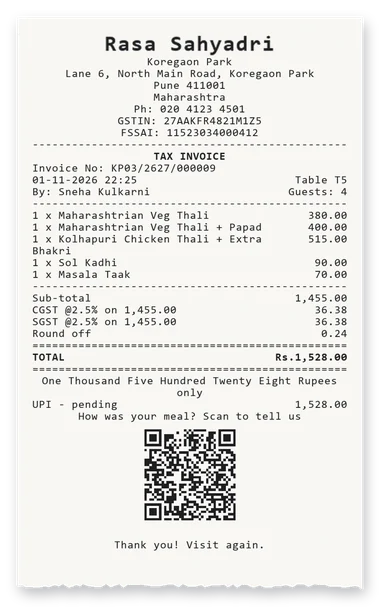
GST restaurant billing, done right
Every bill carries what Indian law and your accountant expect, even when it was printed offline.
- Correct CGST, SGST and IGST, with GST and HSN per dish
- FSSAI licence, outlet GSTIN and full address with PIN on every bill
- A gap-free invoice series for every terminal, even offline
- Full tax invoice on WhatsApp, with the total in words
- Khata (credit) accounts for regular customers
- Read-only access for your CA, with Excel exports
Ready the same day
Most single outlets are billing within an afternoon. Add stock and QR ordering whenever you are ready.
Sign up
Sign up with your mobile number and add your outlets and tables.
Add your menu
Photograph it, or upload a PDF or Excel. Check and publish.
Link devices
Link tablets with a code and add your staff with PINs.
Start billing
Take your first order. Our team is a call away if you need us.
Start with the pilot program
Covers is in pilot. Pilot restaurants get early access, direct support and a say in what we build next. Subscription plans are coming soon.
For a restaurant, café or cloud kitchen with one location.
- Billing, KOT and kitchen display
- Tables, takeaway and delivery
- GST bills and UPI
- Reports and daily email
- Staff PINs and roles
For restaurants who want to shape the product with us.
- Everything in Covers today
- QR table ordering with UPI
- AI audit, Ask AI and menu from a photo
- Direct line to the product team
- Early access to new features
For groups and chains with two or more outlets.
- All outlets on one screen
- Stock, suppliers and food cost
- Permissions per outlet
- Consolidated reports and P&L
- Onboarding for your team
Covers POS: frequently asked questions
Does Covers work without internet?
Yes. Billing, kitchen tickets and payments keep working when the internet drops. Terminals in the outlet keep talking to each other on the local network, and everything syncs to the cloud when the connection is back. Every terminal has its own gap-free invoice series, so offline bills stay valid.
Is Covers GST compliant?
Covers prints CGST, SGST and IGST correctly with GST and HSN per dish, and shows your outlet GSTIN, FSSAI licence and full address on every bill. Your CA can get read-only access and Excel exports.
What hardware do I need?
Any Android tablet or phone, or a computer with a modern browser. For printing, 58 mm or 80 mm thermal printers work for both KOTs and bills, connected over the network, by USB or Bluetooth, or built into the terminal. From a browser, Covers prints through the free Covers Print Bridge app for Windows.
Can I print KOTs and use a kitchen display at the same time?
Yes. In Covers Admin › Kitchen you choose Print only, Display only, Print + Display, or a different choice for each station, for example the bar on paper and the main kitchen on a screen. You can change it at any time.
How does QR table ordering work?
Each table gets a QR code. Guests scan it, see your menu, order, call the waiter, follow their order and pay by UPI, with no app to install. You decide whether staff approve each order first, and you can pause QR ordering from Covers Admin at any time.
How long does it take to set up?
Most single outlets are live the same day: sign up, photograph your menu, link your tablets with a code and add staff PINs. For two or more outlets, our team checks your details and helps you go live.
Can I manage multiple outlets?
Yes. Every outlet appears on one screen in Covers Admin, with permissions per outlet, consolidated reports and the option to ask questions like “how did Baner do yesterday?”.
How much does Covers cost?
Covers is currently in a pilot program, and subscription plans are coming soon. Contact us for pilot pricing for your restaurant.
What happens if a tablet is lost or stolen?
Revoke it from Covers Admin and it can no longer bill or see your data. A reset device can be brought back with Re-link, keeping its invoice series. How we keep Covers secure.
Ready to see Covers in your restaurant?
Book a free demo. We’ll set it up with your own menu so you can see exactly how service will run.