KOT printer or kitchen display? How to choose, or use both
Paper tickets are simple and reliable; screens add timers and fewer lost orders. Here is how to choose for each station in your kitchen.
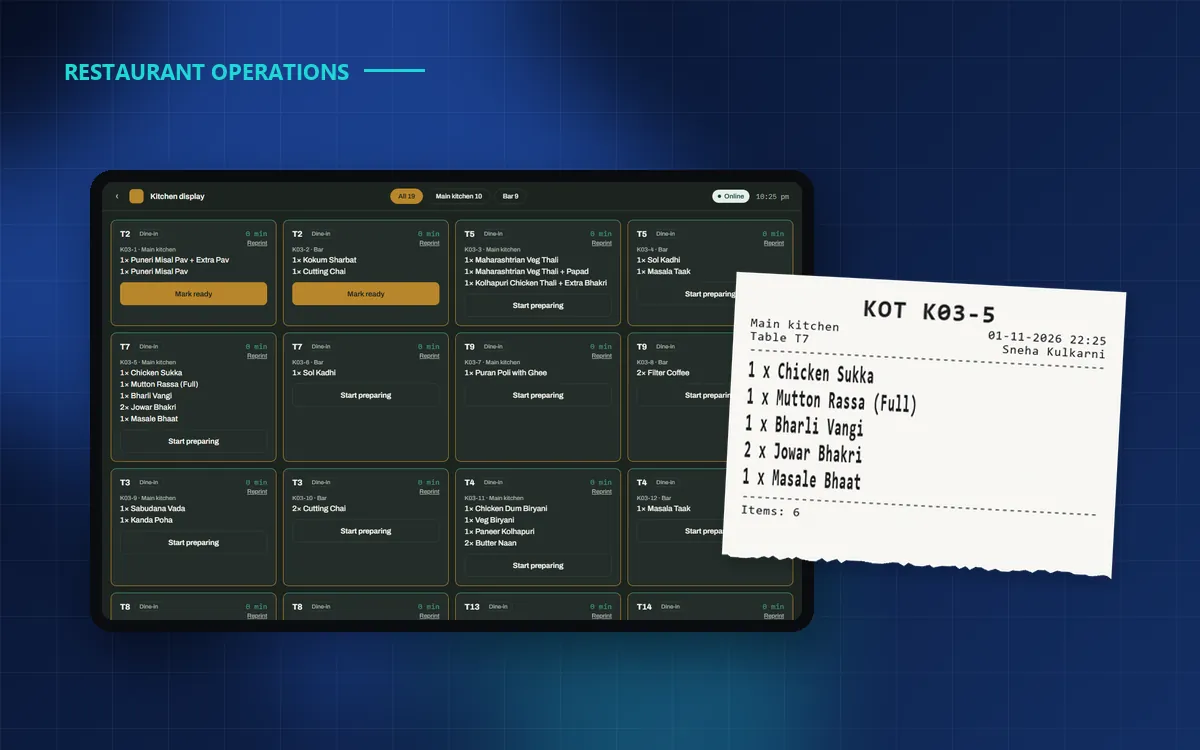
Every order a captain takes has to reach the right person in the kitchen, quickly and clearly. In Indian restaurants that has traditionally meant a printed KOT (kitchen order ticket). Kitchen display systems (KDS) now offer a screen instead. Which is right for you?
Printed KOTs: simple and familiar
A thermal printer at each station prints the dishes for that station the moment the order is sent.
- Pros: cooks already know how to work with paper, it costs little, and a ticket can be stuck on the pass or handed to a runner.
- Cons: tickets get lost, wet or mixed up; there is no timer; and paper rolls and printer upkeep are a running cost.
Kitchen display: timers and fewer lost orders
A screen in the kitchen shows every open ticket for that station, oldest first, with how long it has been waiting.
- Pros: nothing gets lost, timers show what is running late, cooks mark dishes ready with a tap, and captains see the status without walking in.
- Cons: it needs a tablet or screen that can handle heat and grease, and staff need a day or two to get used to it.
The best answer is often both, station by station
Different stations have different needs. A main kitchen with several cooks benefits from a screen with timers. A bar or a small tandoor counter is often happier with paper. Many restaurants also like a printed KOT as a backup on busy nights.
- Main kitchen: display, or display plus print.
- Bar and beverages: print.
- Tandoor or a live counter: whatever the cook prefers.
Choose per station, not for the whole restaurant. Your bar and your main kitchen don’t work the same way.
What to look for in your POS
- Each menu section goes to the right station automatically, and one order splits into one KOT per station.
- You can switch between print, display or both without calling the vendor.
- A CANCEL KOT prints when a sent dish is voided, so the cook stops making it.
- Reprints are marked and recorded, so duplicate tickets don’t become a loophole.
- Printing and the kitchen display keep working when the internet is down.
- Every terminal warns you if a printer runs out of paper or goes offline.
How Covers handles it
In Covers, the owner chooses in Covers Admin › Kitchen: Print only, Display only, Print + Display, or a choice per station. Network, USB, Bluetooth and built-in thermal printers are supported, and it all works offline. Our team sets up your printers with you during onboarding.
Key takeaways
Paper is simple, screens are clearer, and most kitchens benefit from a mix. Pick a POS that lets you choose for each station and change your mind later. Book a Covers demo to see both in action.